A Custom RL Environment for a 6‑DoF Robotic Arm
Turn the simulated Doosan arm into a complete reinforcement‑learning environment — with a target sphere, a reset, and a state/action/reward interface you can plug your own algorithm into. On ROS 2 Jazzy + Gazebo Harmonic (Ubuntu 24.04).
Este tutorial está disponible únicamente en inglés.
Updated June 2026. Rewritten for ROS 2 Jazzy + Gazebo Harmonic (gz‑sim). The original targeted ROS 2 Foxy + Gazebo Classic (both end‑of‑life). The environment now talks to Gazebo through the
ros_gzbridge instead of the oldgazebo_rosservices and topics — see what changed.
What you’ll build
- Launch the arm and a target sphere together in Gazebo.
- Reset the episode — return the arm home and teleport the sphere to a new random position.
- Read a state (arm + target), send an action, and compute a reward.
- Run full episodes of random actions — the integration point for your own RL algorithm.
Prerequisites
| Requirement | Version (tested) |
|---|---|
| Ubuntu | 24.04 |
| ROS 2 | Jazzy |
This tutorial builds on the arm simulation. If you haven’t set up the workspace and dependencies yet, start with Simulating a 6‑DoF Robotic Arm — it covers the apt dependencies, cloning the repo, and building. The same ~/ros2_ws workspace is used here.
A quick word on reinforcement learning
An RL problem is a Markov Decision Process: an agent observes a state, takes an action, and receives a reward; the goal is to learn a policy that maximizes cumulative reward over time. An environment just needs to offer two things to the agent:
reset()— start a fresh episode and return the initial state.step(action)— apply an action and return the next state, the reward, and whether the episode is done.
That is exactly what this package provides for the robotic arm.
1. Run the environment
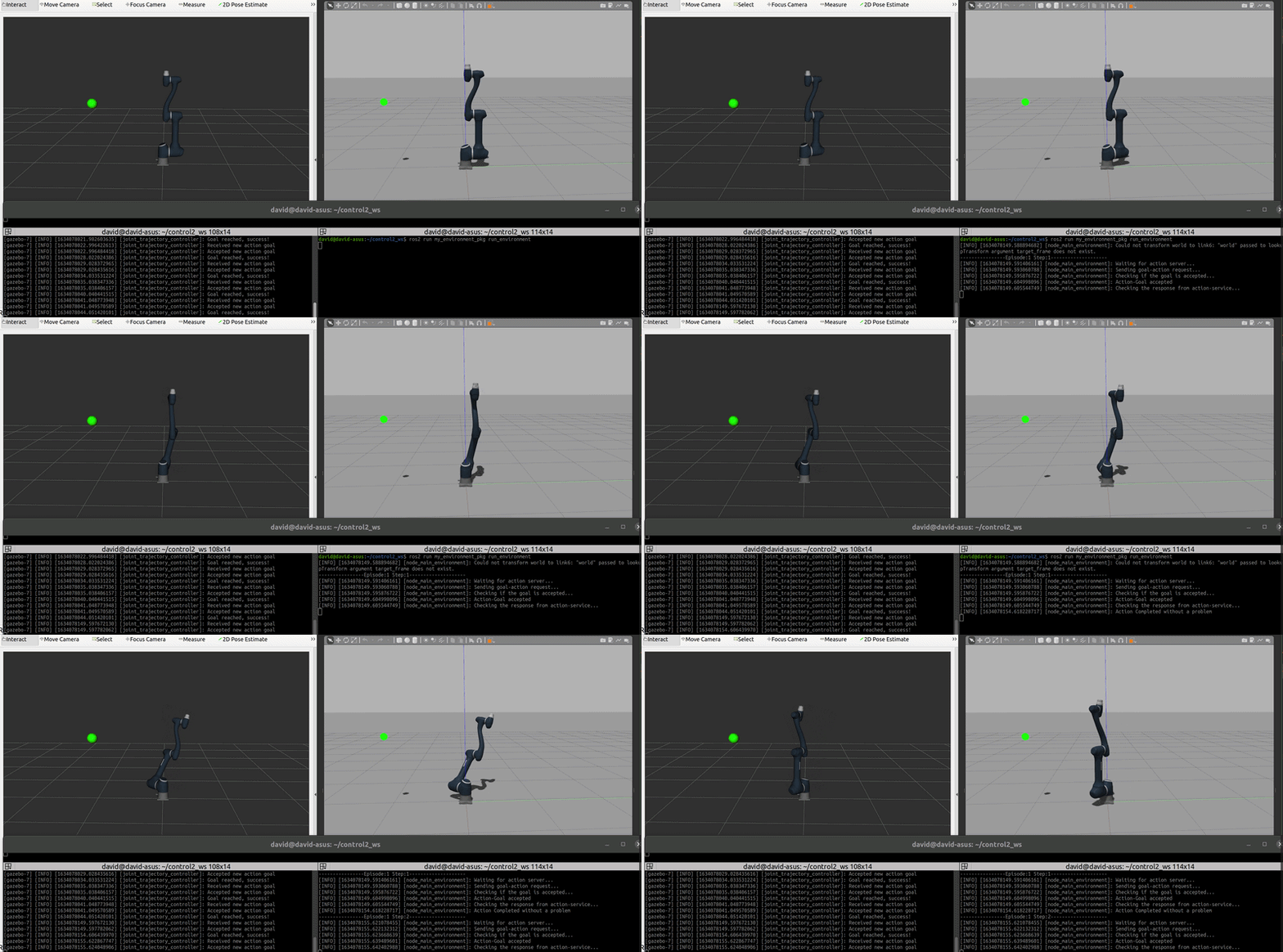
One launch file starts Gazebo, spawns the arm and its controllers, and spawns the target sphere with its bridge:
ros2 launch my_environment_pkg my_environment.launch.pyIn a second terminal, run the episode loop. The arm performs random actions; when an episode ends it resets — the arm returns home and the green sphere jumps to a new random spot — and the next episode begins:
ros2 run my_environment_pkg run_environmentBoth terminals need the workspace sourced first:
source /opt/ros/jazzy/setup.bash && source ~/ros2_ws/install/setup.bash.
How it’s built
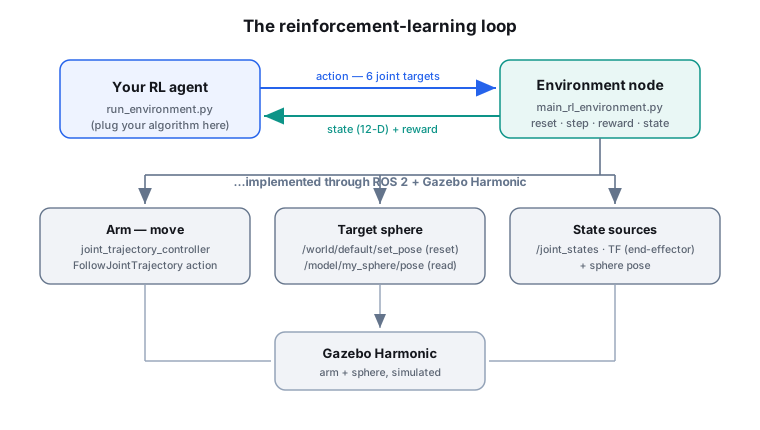
Three packages cooperate, each with one job:
| Package | Role |
|---|---|
my_doosan_pkg | the arm + controllers (from the first tutorial) |
my_sphere_pkg | the target sphere: spawn, reset, and pose readback |
my_environment_pkg | the environment node tying it together (state / action / reward / reset) |
The target sphere
The sphere is the goal. The environment needs to (a) move it to a new random position on reset and (b) know where it is. In Gazebo Harmonic both go through the ros_gz bridge.
Move it — call the set_pose service of the world (type ros_gz_interfaces/srv/SetEntityPose):
from ros_gz_interfaces.srv import SetEntityPose

self.client_reset_sphere = self.create_client(SetEntityPose, '/world/default/set_pose')
...
req = SetEntityPose.Request()
req.entity.name = 'my_sphere'
req.entity.type = req.entity.MODEL
req.pose.position.x = random.uniform(0.05, 1.05)
req.pose.position.y = random.uniform(-0.5, 0.5)
req.pose.position.z = random.uniform(0.05, 1.05)
self.client_reset_sphere.call_async(req)
Read it — the sphere model carries a pose publisher, bridged to a plain topic the node subscribes to:
from geometry_msgs.msg import Pose
self.create_subscription(Pose, '/model/my_sphere/pose', self.target_pose_callback, 10)
The environment node
All the RL logic lives in my_environment_pkg/my_environment_pkg/main_rl_environment.py. It exposes the pieces an agent needs:
- State — the end‑effector position (from TF), the six joint angles (from
/joint_states), and the sphere position. A 12‑dimensional vector. - Action — six target joint angles, sent to the arm via the
FollowJointTrajectoryaction of thejoint_trajectory_controller. - Reward — based on the distance between the end‑effector and the sphere.
- Reset — arm to home + sphere to a new random pose.
The reward is simple and easy to change:
distance = np.linalg.norm(end_effector_xyz - sphere_xyz)
if distance <= 0.05:
    reward, done = 10, True     # reached the goal
else:
reward, done = -1, False # one step closer, keep going| Component | Definition |
|---|---|
| State (12‑D) | end‑effector x,y,z · joint1…6 · sphere x,y,z |
| Action (6‑D) | target angle for each joint (radians) |
| Reward | +10 on reaching the sphere (distance ≤ 0.05 m), −1 per step |
| Done | goal reached (or episode horizon hit) |
2. Plug in your own RL algorithm
run_environment.py is the integration point. Its loop is deliberately tiny — swap the random action for your policy and store transitions for learning:
for episode in range(num_episodes):
    env.reset_environment_request()             # new episode
    for step in range(episode_horizon):
        action = env.generate_action_funct()    # <-- replace with your policy(state)
        env.action_step_service(action)         # apply the action
        reward, done = env.calculate_reward_funct()
        state = env.state_space_funct()
        if done:
            break
Keep RL code separate. This package is the environment only — it stays algorithm‑agnostic. Your DDPG/SAC/PPO implementation should live in its own package and import this one, so the environment can be reused across experiments.
What changed from the old (Foxy + Gazebo Classic) tutorial
| Old (Foxy / Classic) | New (Jazzy / Harmonic) | |
|---|---|---|
| Move the sphere | /gazebo/set_entity_state (gazebo_msgs) | /world/default/set_pose (ros_gz_interfaces/SetEntityPose) |
| Read the sphere | /gazebo/model_states (gazebo_msgs) | /model/my_sphere/pose (gz pose publisher, bridged) |
| Environment file | main_environment.py | main_rl_environment.py (the old one was retired) |
| Joint readout | fixed index order | mapped by joint name (gz order differs) |
| Launch | Classic gazebo + gazebo_ros | ros_gz_sim + /clock bridge |
Next steps
- Tutorial 1 — Simulating the 6‑DoF arm (the foundation for this one).
- robotic_arm_environment — full source code.
- Back to all projects.